Mulgore

ompcraft

Your AI coding agents, in your quest log

Watch your omp agents work without leaving World of Warcraft: Forever. A native objective tracker, achievement pop-ups when one finishes or needs you, and every reply on parchment, one click away.

[ompcraft] Install in one line, then start the game:

Every agent, at a glance

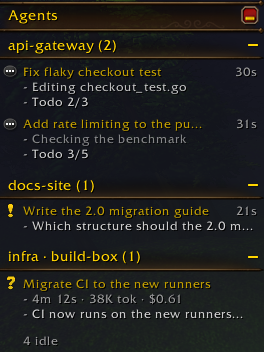
Agents sit in a quest-style tracker, top left by default, or under your objectives or wherever you drag it, grouped by Tern session. Working agents show what they're doing right now and how far through their todo list they are. Idle ones fold into a single line, so the list stays short.

Quest markers

  • Needs you. It asked a question and is waiting.
  • Finished. You haven't looked yet.
  • Working. Live activity and todo progress.
  • Failed or exited. Something went wrong.

Remote hosts attached to your Tern window show up too, labelled with their name.

The ompcraft tracker in the game: agents grouped under api-gateway, docs-site and infra on build-box. Two are working with their current step and todo count, one needs you, one finished, and four are idle.
In game, at native size ×2. Demo agents.

Read the reply without alt-tabbing

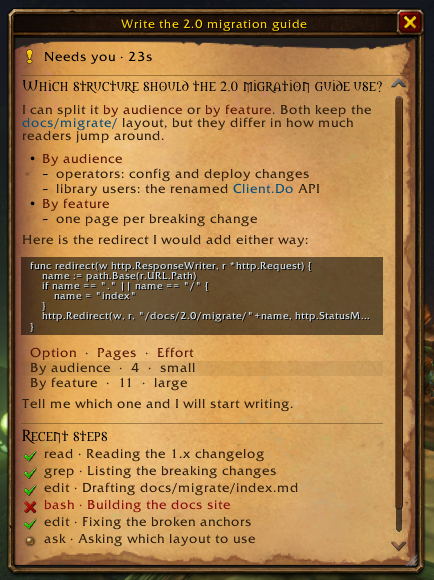
Click an agent and its last reply opens on parchment, formatted the way it was written: headings, nested lists, inline code, code blocks and tables. Below it are the turn's recent tool steps, and the model and session it ran in.

Agent page

Up to 12 lines of each code block, indentation intact

Recent steps marked done, failed or running

Resize it; it remembers

Reply text never leaves your PC. Keep it out of the game entirely with ompcraft config detail off

The agent page in game: parchment with the agent's question as a heading, two options as a nested list, a Go code block, a three-row table, and six recent tool steps with green checks and one red cross.
In game. Demo agent.

Pop-ups that wait until you're out of combat

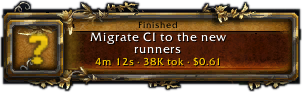
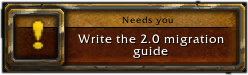
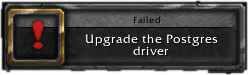
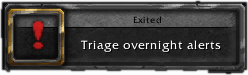
When an agent finishes, needs you, fails or exits, you get an achievement-style pop-up with its time, tokens and cost. Pull a boss and they queue up; they arrive when combat ends.

Pop-ups

Click one to open that agent

Sound and a chat line, each optional

All four here are real in-game captures of demo agents.

Needs you: Write the 2.0 migration guide. Finished: Migrate CI to the new runners, 4m 12s, 38K tokens, $0.61. Failed: Upgrade the Postgres driver. Exited: Triage overnight alerts.

Make it yours

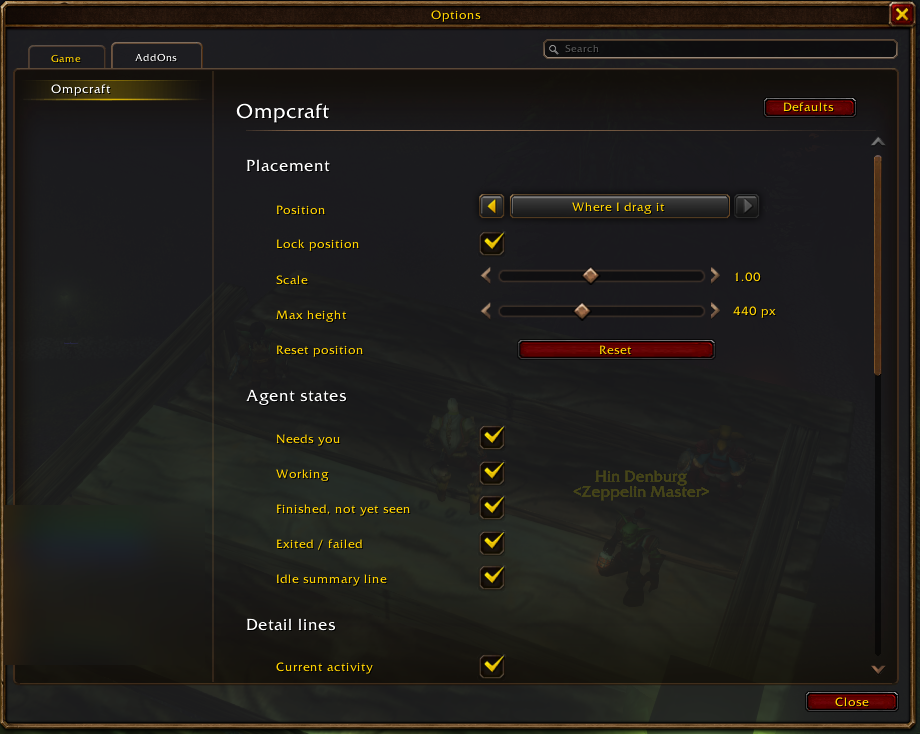
A native settings page lives under Options › AddOns › Ompcraft, or type /oc config.

Settings

Top left, under your quest objectives, top right, or wherever you drag it

Lock, scale and cap its height

Choose which agent states and detail lines show

Hide it in combat, or in dungeons, raids and PvP

Pick which pop-ups, sounds and chat lines you get

The Ompcraft settings page in the game's Options window: position, lock, scale and max height, then switches for agent states, detail lines, visibility and alerts.
In game.

How it works

WoW addons can't open a socket or read a file. ompcraft passes messages the only ways an addon can notice them: addon files it can load on demand, and sound files whose presence it can check.

Objectives

  1. Your omp agents report to Tern, on this PC or on a remote host1/1
  2. The Tern plugin hands their state to the companion on 127.0.0.1, every 500 ms1/1
  3. The companion writes plain-data Lua into a pre-installed slot addon and rings a doorbell file1/1
  4. The addon hears the doorbell and loads the slot: 67–174 ms in testing, no /reload1/1

Rewards

You will receive:

  • Nothing leaves your PC
  • No screen capture
  • No input sent to the game
  • Snapshot files wiped when the game or companion exits

The full design: PROTOCOL.md

Is it safe?

Unofficial fan project · Not approved by Blizzard

Uses: public addon APIs, plus a separate program that writes data files into your Interface/AddOns folder. WeakAuras Companion and the TSM and Wago apps have done the same for years.

Never: reads or changes game memory · injects into the client · captures your screen · sends keystrokes, clicks or controller input · plays the game for you.

Respects combat lockdown, Blizzard's secret-value restrictions and the add-on policy: free, visible source, no ads, no chat spam.

"No Blizzard text approves or forbids a tool like this. It relies on undocumented client behaviour that can change at any time. Use it at your own risk."

One line. Then log in.

[ompcraft] Installs the companion, the addon and the Tern plugin, and starts a user service:

curl -fsSL https://raw.githubusercontent.com/TechDufus/ompcraft/main/install.sh | sh

Needs WoW: Forever and Stencil Tern running omp. Tested on Linux with Proton; macOS is planned. Something off? ompcraft doctor says what to fix.

Unofficial fan project · not approved by Blizzard · agents shown are demo data